The ChatGPT Work-Mode Gotcha That Set Off My Stream Deck: Nuke Alert!
We are about to move and need to figure out how much stuff we have. I’ve taken 40 photos of everything. “Now let’s put ChatGPT to the test,” I thought, to sort out all this stuff. At the same time, I wanted to experiment with Google Drive connections/plugins, which I hadn’t touched before. So I uploaded the photos to a Google Drive folder and added the ChatGPT connection, which was smooth: a couple of clicks and it was all done.
I made sure the Google Drive plugin was active and then asked it to look through all the photos in the folder and create a stuff.md file with everything divided by category. It went to work and intelligently said:
I’m processing them as one inventory, taking care not to count the same object twice when it appears in several angles.
Less than a minute later, my Nuka Cola Stream Deck started flashing.
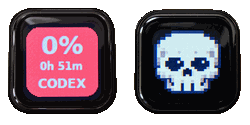
ChatGPT Work nuked my Codex five-hour usage!
I’ve never used ChatGPT Work before. I’ve only used Chat or Codex on my local computer. Apparently, by using the Google Drive plugin, I switched to Work mode, and the 5% of my Codex messages that I had left for this five-hour window got eaten up by this request in less than a minute. Image processing is heavy. Fine. What I hadn’t understood was that activating the Google Drive plugin switched me to Work mode. Neither was the fact that it uses your Codex messages, although I might have read that somewhere, sometime ago.
So the move needs to wait another hour. Or I should just pretend we’re moving to a friend’s house on the other side of the island of Maui.